A small business owner I talked to last month described the spreadsheet their company runs on as “fine, just a bit messy”. They proceeded to mention a close call where a new hire had overwritten last quarter’s invoicing tab. Then the fact that Marco, their accountant, is the only one who really understands how the numbers reconcile. Then that end of month reporting is a full day of somebody copying figures between sheets.
Each of those things, on its own, is a small irritation. Stacked together, they’re a bill. The spreadsheet isn’t costing the business nothing. It’s costing them every month, in ways that don’t have an invoice attached.
This is the post I wish I could send to everyone who contacts me describing these symptoms. Seven signs that your internal tool has outgrown itself, a rule for reading them, and what “already paying the cost” actually looks like when you add it up.
”Rewrite” is the wrong word
“Rewrite” is the word people reach for when they talk about this, and in practice it’s a trap. It implies custom software, which implies a big budget and a big timeline, which makes the whole decision feel scarier than it usually is.
The honest word is replacement, and replacement has cheap options. Sometimes the replacement is a SaaS tool that already exists and costs €40 a month. Sometimes it’s a better-structured spreadsheet with an owner and a few validation rules. Sometimes it’s a no-code database like Airtable. Sometimes, yes, it’s custom software, because the workflow is specific enough that no vendor builds for it.
This post is about whether to replace. If the answer is yes, the next question is what to replace with, and I wrote a separate post about that. For now, set the “with what?” question aside. The only thing to decide today is whether you’re still paying less for the current tool than you would for its replacement.
The seven signs
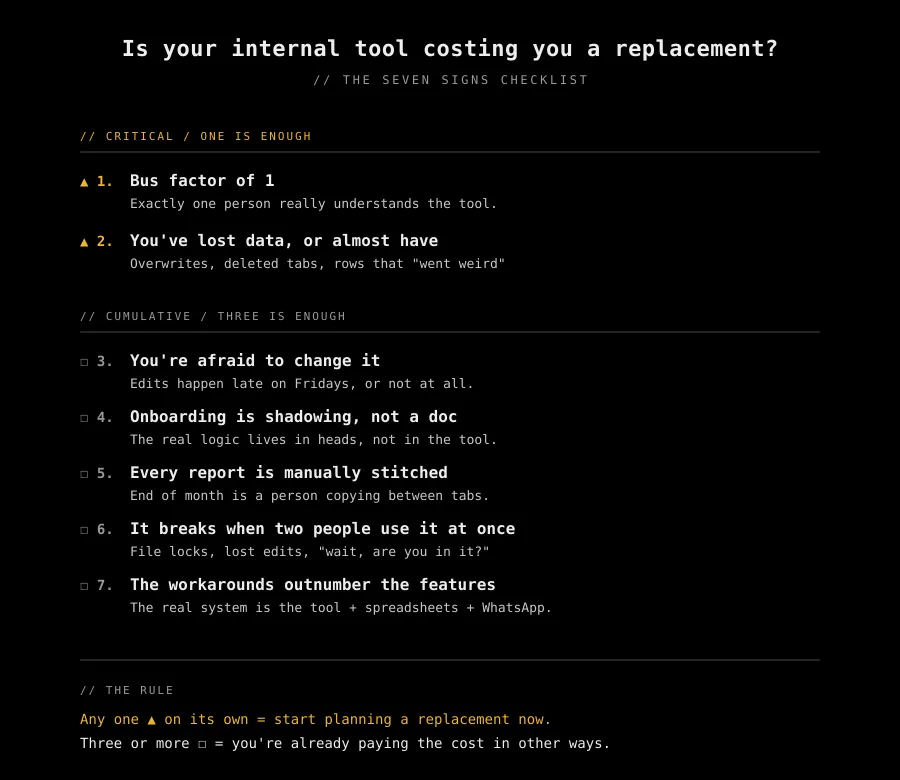
These are the seven patterns I see in businesses whose internal tool has quietly outgrown itself. They aren’t a scorecard, and they aren’t accusations. Every business has two or three. The question is which ones, and how many.
1. Bus factor of 1
Exactly one person really understands the tool. It might be the founder. It might be the long tenured employee who built the pricing sheet three years ago and has been its unofficial maintainer ever since.
One person holding the whole thing up and it’s one holiday, one resignation, or one bad week away from becoming a crisis. And most don’t notice it until that crisis manifests itself.
2. You’ve lost data, or almost have
A tab got deleted and nobody noticed for a week. A row “went weird” and last month’s invoicing broke. Somebody typed a formula into the wrong cell and overwrote three months of entries. You were one Ctrl-Z away from a very bad day, and the only reason it didn’t become one is that somebody happened to notice in time.
A tool with no meaningful safety net is a tool that charges for its mistakes in units of trust. Once a customer has caught a mistake in something you sent them, the damage isn’t the hours spent fixing it. It’s the awkward conversation that happens when they next renew. One incident is bad luck. A second one tells you the tool isn’t safe to rely on.
3. You’re afraid to change it
Edits happen late on Fridays, when nobody else is in the system. Or they don’t happen at all. There are rules like “don’t touch the pricing sheet” and “ask before opening the CRM file.” New ideas get deferred because trying them might break something important, and nobody is sure what.
At that point your tool has become an artifact the team works around it rather than with. A business that’s afraid to change its own systems stops improving them, and the cost compounds quietly for as long as the fear is there.
4. Onboarding is shadowing, not a doc
A new hire learns the tool by sitting next to somebody who knows it, for days. There’s no written guide, or the written guide is now an ancient relic that nobody trusts. The real logic lives in the heads of the people who use the tool, not in the tool itself.
That’s two salaries for one person’s output, for however long the shadowing takes. And that cost recurs for every hire. What the tool should be doing, teaching people how it works, is instead a job, for whoever’s been there the longest.
5. Every report is manually stitched
End of month is a ritual. Somebody exports a CSV from the legacy app, pastes it into Excel, runs a pivot, corrects a few rows by hand because of oddly formats dates, and emails the result to leadership. Or three people each pull their slice, and a fourth person spends a morning reconciling them.
The tool stores data, but it doesn’t turn it into anything actionable. Closing that gap is somebody’s job. Ten hours a month adds up to nearly two weeks a year, spent doing by hand what a small amount of automation could handle on a schedule.
6. It breaks when two people use it at once
Slack messages like “are you using it?” and “wait, can I open the file?“. Two people overwriting each other’s edits, or locked out entirely, because the tool was built for one user and the business has more than one. Shared drives, single user licenses, web tools on starter plans, legacy databases that lock the whole table when one user is editing a single record.
Each one of these is a context switch for two people, plus a few minutes of rework to reconcile what got lost. None of the individual incidents is dramatic. The running total, across a year, is.
7. The workarounds outnumber the features
The real process isn’t the tool. It’s that plus a WhatsApp group plus one person’s memory. The main application is one component in a larger system that nobody drew on purpose, nobody documented, and nobody owns end to end. New hires figure out the main tool in a week and the surrounding scaffolding over six months, because the scaffolding is where the actual work happens.
This is usually the last sign to appear, and by then the tool has been the wrong fit for a while. You can tell you’re here by asking: “if we deleted that tomorrow, how much of the work would actually stop?” Often less than you’d expect, because the workarounds have absorbed most of the real logic.
The rule
Two tiers, both qualitative, both honest about being approximate.
Any one of sign 1 or sign 2 on its own means start planning a replacement now. These are single points of failure. Bus factor and data loss don’t compound slowly in the background, they break something on a random Tuesday and leave you to deal with it under pressure.
Three or more of the other signs means you’re already paying the replacement cost in other ways. The hours, the rework, the shadow onboarding, the contention tax. They’re already leaving the business. You just aren’t invoicing them to yourself.
The thresholds are approximate on purpose. If you’re genuinely not sure whether you have two signs or three, count it as three and start planning.
What “already paying” actually looks like
The signs sound abstract. The cost isn’t. Here’s what those signs look like as actual costs:
- Bus factor is an implicit insurance premium you haven’t quoted. One day the person leaves, and the premium gets paid in a single lump, usually at the worst possible time.
- Data loss is reconstruction labor plus trust damage with customers. You can price the first. You can’t price the second, which is why it’s always bigger than it looks.
- Fear of change is every improvement that doesn’t get tried. Nothing shows up as cost, but the gap between what the tool does and what the business needs keeps widening.
- Manual reporting is N hours per month times twelve months times the hourly rate of whoever works on it. This one is easy to count.
- Onboarding shadowing is weeks of two salaries paying for one person’s output. Multiply by how often you hire.
- Contention is every “are you using that?” Slack message, and the time it takes afterwards for each person to remember where they were and get back into it.
- Workaround sprawl is time nobody thinks of as a cost. Everyone maintains their slice of the scaffolding (a spreadsheet, a thread, a private doc) and the total never lands on anybody’s plate.
10 hours/month of manual reporting × 12 months × €30/hour = €3,600/year.
That’s before the near misses, before the onboarding time, before the bus factor premium.
One item out of seven in the list, and it’s already pricing a replacement’s first year.
Most businesses never add these up. Once you do, “a replacement would be expensive” starts to look different. You’re not choosing between zero and expensive. You’re choosing between a cost you can see and a cost you can’t.
Example 1: yes, replace it
A regional services firm I worked with was running on an Access database a former employee had built in 2011. Sign 1 was obvious: a single employee was the only person who’d ever understood the stored procedures, and he’d been gone for six years. Data loss (sign 2) had happened twice in the last year, once badly. On top of those, they hit every other sign on the list.
They’d been quoted €15k for a “rewrite” two years earlier and declined as it was deemed too expensive. When we sat down and counted, manual reporting alone was costing them close to €7k a year, onboarding each new hire was eating another €3k, and one of those incidents had been visible enough to a customer that they didn’t renew. Twelve months of keeping the Access database was already more expensive than replacing it. They just hadn’t been looking at it that way.
We replaced the core workflow with a SaaS that fit most of it, kept a thin custom layer for the two things it couldn’t do, and retired the Access database over a weekend.
Example 2: no, you’re fine
A small ecommerce owner I know personally got cold called by a sales rep pushing “a real system” to replace their WooCommerce backoffice. The pitch was convincing enough that they rang me just to check if they were about to sign something they didn’t actually need. We spent an hour walking through the signs. They had signs 4 and 5: onboarding was shadowing, and yes, and every month somebody had to pull exports out of it. But that was it.
I told them not to sign, and talked them out of hiring me. What they needed was a one-pager explaining the non-obvious parts of their setup: which plugins do what, what the order statuses mean, the gotchas a new hire would otherwise only pick up by sitting next to someone. An afternoon of writing, no replacement needed.
They still run on the same backoffice today. If the situation changes, the list will tell them when it’s time to switch.
What to do this week
Whichever side of the threshold you landed on, four actions are worth doing now. They’re cheap, reversible, and useful either way.
- Name an owner for the tool. Even if the owner is you. Accountable for backups, changes, and the knowledge about how it works.
- Write down what the tool does that isn’t obvious. The hidden logic. The workarounds. The pieces only one person knows. Whatever a new hire would have to be told.
- Back it up somewhere else. Not the same laptop. Not the same account. A copy that survives a single bad thing happening.
- Count the manual hours spent on it across the next 30 days. Put the number somewhere you’ll see it. In a month you’ll know whether you’re in the “already paying” tier.
If the verdict was replacement, these four actions feed directly into whatever replacement you end up picking. Otherwise, they are the replacement.
The takeaway
You aren’t deciding whether to pay, only whether to pay visibly or invisibly. Most of the clients who eventually call me have been paying out of view for years, and what finally makes them pick up the phone is a bad week making it visible.
If you’re stuck scoring your own tool against this list, I’ll be happy to help you sort it.