Uptime SLAs, support SLAs, and why your developer won't promise the first
Most people who build custom software don't offer an uptime SLA, and that's honesty, not a red flag. The two very different things called an SLA, which one you buy, which one you sign, and how to read the fine print on both.
A client once asked me, half joking, if I could promise “99.9% uptime” on the app I was building them. They’d read the phrase on a SaaS provider’s pricing page and it sounded like a reasonable thing to ask for.
Sure, I said. Let’s cost it out. 99.9% uptime sounds like basically always, but it works out to about 43 minutes of downtime a month.
So I told them we should build a robot. It watches the servers day and night, and the instant something breaks it kicks down my bedroom door, injects me with coffee and stands over me while I fix the problem before that 43 minutes runs out.
They laughed, and then they got the point.
And yet we did sign an SLA that day. Just not the one they’d walked in asking for, because the word means two completely different things.
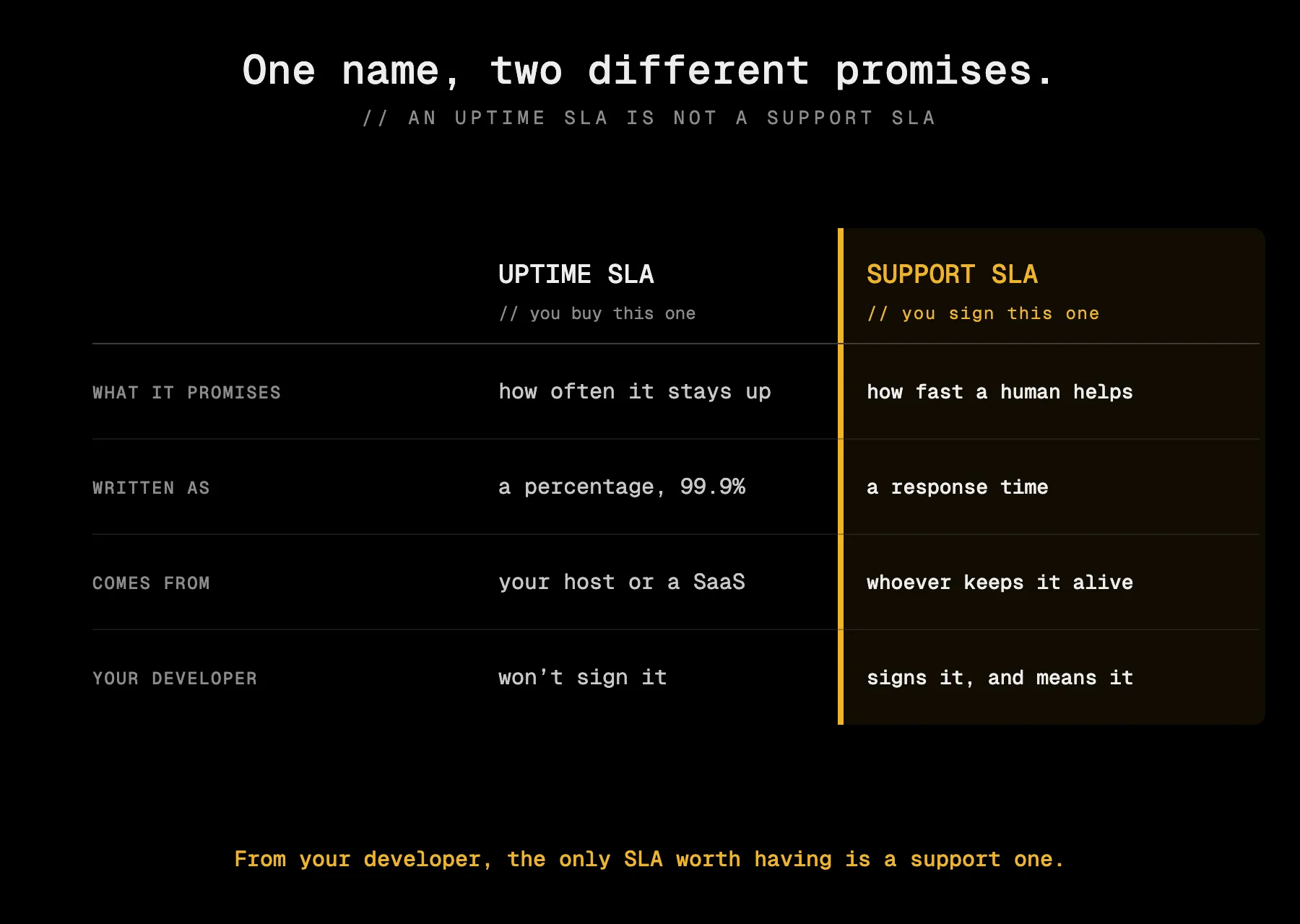
The only SLA worth having from your developer is a support SLA.
Two different things wear the same name
Most of the confusion here comes from one word doing two jobs. When people say “SLA,” a service level agreement, they could mean either of two things that have almost nothing to do with each other.
- The uptime SLA. A promise about how often the software is up and reachable, written as a percentage, with a small refund if it turns out to be wrong. This belongs to the companies that run software for a living: your hosting provider, your payment processor, the subscription based software tools your app uses. You buy this one together with the product.
- The support SLA. A promise about how fast a human starts helping when something goes wrong. No uptime percentage, no magic numbers, just “if this breaks, here’s how quickly I respond.” This lives inside a maintenance arrangement, sometimes SaaS offers this too. You sign this one, with whoever keeps your software alive.
The one my client asked for was the uptime SLA. What we actually signed was a support SLA. Let’s take them one at a time.
Why the person building your software won’t sign an uptime SLA
That joke about the robot lands because a promise about uptime is really a promise about redundancy and people, and somebody like me controls neither in the way you’d need.
- You can’t promise more uptime than the ground you stand on. Your app runs on top of somebody else’s servers, usually a big cloud provider. If that provider only promises 99.9%, I cannot honestly promise you 99.99%, because when they go down I go down with them. To beat their number I’d have to run a second copy of everything, in a second location, ready to take over the instant the first fails. That’s real money, and it’s rarely money you meant to spend.
- Uptime is a promise about who’s awake at 3am. A solo developer, or a small team, physically can’t guarantee someone is watching around the clock every night of the year. That’s why the big companies that genuinely can’t afford downtime pay whole teams (Site Reliability Engineers) to do little else but keep the system up, taking turns on call so somebody is always awake.
- It’s a real financial liability. An uptime SLA usually comes with penalties. Signing one means betting your own money on a number partly outside your control. Most sensible small vendors, quite rightly, won’t take that bet, and you should be a little suspicious of the ones who wave it around too eagerly.
So when a builder tells you they don’t do uptime SLAs, it’s them refusing to sell you something they can’t deliver.
The uptime SLA you actually buy
Here’s the part that trips people up: you almost certainly have uptime SLAs already, several of them. They came bundled with the services your software is built on. Every serious SaaS tool you rely on has one, buried in the terms you clicked past.
That’s where all the material below actually matters, because you’re the buyer of these, and knowing how to read one tells you how much of your business’s reliability you’re really getting. So let’s read one properly.
What the numbers actually mean
Uptime is the share of time the service is working and reachable, written as a percentage. The industry talks in “nines”:
- 99% is about 7 hours down per month, or three and a half days a year.
- 99.9% is about 43 minutes down per month, roughly 9 hours a year. This is where most normal business software lives.
- 99.99% is about 4 minutes down per month, under an hour a year.
- 99.999% is about 26 seconds down per month, around 5 minutes for the whole year. You mostly see it promised by phone networks, payment systems, and premium cloud infrastructure, and even they rarely deliver it consistently.
On paper 99.9% and 99.999% look like neighbours. In reality they’re different worlds, and the distance between them is where all the money goes.
Reliability is bought with redundancy and with people. One “9” of improvement means another layer of both. A spare server becomes a spare data centre, a spare data centre becomes spares in different countries, each one needing people to run it.
Ask yourself what one hour offline actually costs your business. If the answer is “annoying but survivable,” 99.9% is plenty and you should stop paying there. If the answer is “we break the law every minute we’re down,” then reach for the lowest possible downtime, knowing you’re paying for an entire fire brigade.
”Down” is defined by the people who owe you when it’s down
Before you trust an uptime number, ask who decides when the service counts as down, because the percentage is measured against a definition the provider usually gets to write, and they write it narrowly.
- Who’s measuring? Often the provider, checking their own service from inside their own network.
- What counts as down? Usually “completely unreachable.” So the service being up but too slow to use, or one important feature broken while the front page loads fine, often doesn’t count at all.
- Over what window? A monthly window resets the allowance every month. A yearly one lets a provider have one genuinely awful day and still hit target for the year.
The fine print that lets them off the hook
Every uptime SLA has a list of exclusions, situations where the service can be down and it doesn’t count against their promise:
- Planned maintenance. Downtime scheduled in advance doesn’t count. Fair, but check whether there’s any limit.
- Your fault. If the outage traces to something you did, they don’t owe you. Reasonable, but the boundary of “your fault” is often drawn generously in their favour.
- Third party outages. If a service they depend on fails, many SLAs treat that as not their problem. From where you sit, the thing is down and you can’t take payments, but the contract disagrees.
- Force majeure. Genuine catastrophes, disasters, the internet’s core infrastructure failing. Nobody can promise around those.
When they don’t hold their promise
So the provider blows past the allowed downtime and the service was offline for hours. What do you get?
Almost always, a service credit. Not real compensation for what the outage cost your business, just a bit of your own money back.
Picture the pizza that turns up an hour late, so they don’t charge you for it. Nice gesture. It does nothing about the dinner party you were hosting.
Three things worth checking here:
- Is it automatic, or must you claim it? Most credits apply only if you file a formal request inside a short time window.
- What’s the cap? Credits are almost always capped, often at a fraction of a single month’s fee, no matter how bad the outage was.
- Is it the only remedy? Many SLAs state the credit is your sole remedy, meaning you agree not to come after them for the real damage.
This isn’t dishonesty. No provider can offer to cover your lost business, and credits exist because uncapped liability is uninsurable. If real money depends on your service staying up, you have to cover that risk yourself: a backup, a second provider, or your own business insurance.
Why nobody sane promises 100%
Engineers plan reliability with an error budget: if you promise 99.9%, you’ve effectively said about 43 minutes of downtime a month is allowed, and that allowance what the team gets to spend. It’s what lets them safely do necessary, slightly risky things, ship an update, move to better hardware. Promising 100% means never touching the system, which, as I wrote about what happens to software after you launch it, is its own slow way of falling apart.
The support SLA you actually sign
Now the only one you genuinely negotiate with the person maintaining your software, and it has nothing to do with percentages.
A support SLA answers one question: when something goes wrong, how fast does a human start fixing it, and does everyone agree what counts as an emergency? The good version has two parts.
Severity grading. Problems get sorted by how much they hurt, roughly:
- Critical: the whole thing is down, or losing data, for everyone.
- High: something important is broken, but there’s a workaround or it only hits some users.
- Low: a minor bug or a cosmetic glitch that can wait for normal working hours.
Response times, and the hours they apply to. Each severity gets a promised response time. And here’s what you should know when hiring someone like me: those response times are realistic within sensible working hours, best effort outside them. I can move fast when your critical issue lands on a Tuesday, but I cannot promise to be awake at 3am on a Sunday, I’m a human too.
If your business genuinely needs someone guaranteed awake at 3am, that’s a real and legitimate need, but it’s a different and pricier arrangement: a team large enough to run a proper on call rotation.
Settle this before launch, as part of the maintenance agreement.
The takeaway
Most small and mid sized businesses are sold more uptime than they’ll ever need, because it sounds like more safety, even when it’s really just more cost.
The uptime SLA you don’t really negotiate. You inherit it, bundled into what your software runs on. Your job there is to read it well: check what “downtime” means, read the fine print, and know that it’s not a safety net. Then based on what an hour offline actually costs you, match the tier that works best.
The support SLA is the one you settle with whoever keeps your software alive, and it’s worth settling properly: how problems are graded, how fast a human responds, and during which hours.
If you’re trying to work out how much uptime your business actually needs or what to agree with whoever maintains your software, let’s get on a call and read the fine print together.